**NVIDIA Vulkan Ray Tracing Tutorial**
**Antialiasing**
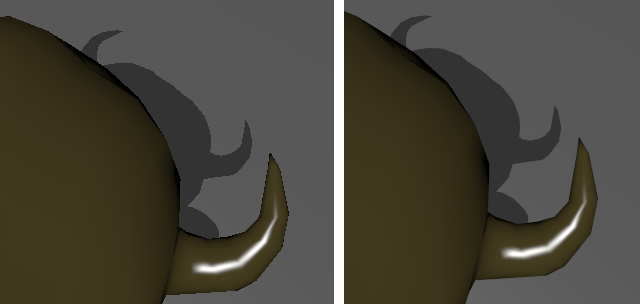
# Introduction
This is an extension of the Vulkan ray tracing [tutorial](vkrt_tutorial.md.htm).
In this extension, we will implement antialiasing by jittering the offset of each ray for each pixel over time, instead of always shooting each ray from the middle of its pixel.
(insert setup.md.html here)
## Random Functions
We will use some simple functions for random number generation, which suffice for this example.
Create a new shader file `random.glsl` with the following code. Add it to the `shaders` directory and rerun CMake, and include this new file in `raytrace.rgen`:
~~~~ C++
// Generate a random unsigned int from two unsigned int values, using 16 pairs
// of rounds of the Tiny Encryption Algorithm. See Zafar, Olano, and Curtis,
// "GPU Random Numbers via the Tiny Encryption Algorithm"
uint tea(uint val0, uint val1)
{
uint v0 = val0;
uint v1 = val1;
uint s0 = 0;
for(uint n = 0; n < 16; n++)
{
s0 += 0x9e3779b9;
v0 += ((v1 << 4) + 0xa341316c) ^ (v1 + s0) ^ ((v1 >> 5) + 0xc8013ea4);
v1 += ((v0 << 4) + 0xad90777d) ^ (v0 + s0) ^ ((v0 >> 5) + 0x7e95761e);
}
return v0;
}
// Generate a random unsigned int in [0, 2^24) given the previous RNG state
// using the Numerical Recipes linear congruential generator
uint lcg(inout uint prev)
{
uint LCG_A = 1664525u;
uint LCG_C = 1013904223u;
prev = (LCG_A * prev + LCG_C);
return prev & 0x00FFFFFF;
}
// Generate a random float in [0, 1) given the previous RNG state
float rnd(inout uint prev)
{
return (float(lcg(prev)) / float(0x01000000));
}
~~~~
## Frame Number
Since our jittered samples will be accumulated across frames, we need to know which frame we are currently rendering. A frame number of 0 will indicate a new frame, and we will accumulate the data for larger frame numbers.
Note that the uniform image is read/write, which makes it possible to accumulate previous frames.
In `raytrace.rgen`, add the push constant block from `raytrace.rchit`, adding a new `frame` member:
~~~~ C++
layout(push_constant) uniform Constants
{
vec4 clearColor;
vec3 lightPosition;
float lightIntensity;
int lightType;
int frame;
}
pushC;
~~~~
Also add this frame member to the `RtPushConstant` struct in `hello_vulkan.h`:
~~~~ C++
struct RtPushConstant
{
nvmath::vec4f clearColor;
nvmath::vec3f lightPosition;
float lightIntensity;
int lightType;
int frame{0};
} m_rtPushConstants;
~~~~
## Random and Jitter
In `raytrace.rgen`, at the beginning of `main()`, initialize the random seed:
~~~~ C++
// Initialize the random number
uint seed = tea(gl_LaunchIDEXT.y * gl_LaunchSizeEXT.x + gl_LaunchIDEXT.x, pushC.frame);
~~~~
Then we need two random numbers to vary the X and Y inside the pixel, except for frame 0, where we always shoot
in the center.
~~~~ C++
float r1 = rnd(seed);
float r2 = rnd(seed);
// Subpixel jitter: send the ray through a different position inside the pixel
// each time, to provide antialiasing.
vec2 subpixel_jitter = pushC.frame == 0 ? vec2(0.5f, 0.5f) : vec2(r1, r2);
~~~~
Now we only need to change how we compute the pixel center:
~~~~ C++
const vec2 pixelCenter = vec2(gl_LaunchIDEXT.xy) + subpixel_jitter;
~~~~
## Storing or Updating
At the end of `main()`, if the frame number is equal to 0, we write directly to the image.
Otherwise, we combine the new image with the previous `frame` frames.
~~~~ C++
// Do accumulation over time
if(pushC.frame > 0)
{
float a = 1.0f / float(pushC.frame + 1);
vec3 old_color = imageLoad(image, ivec2(gl_LaunchIDEXT.xy)).xyz;
imageStore(image, ivec2(gl_LaunchIDEXT.xy), vec4(mix(old_color, prd.hitValue, a), 1.f));
}
else
{
// First frame, replace the value in the buffer
imageStore(image, ivec2(gl_LaunchIDEXT.xy), vec4(prd.hitValue, 1.f));
}
~~~~
# Application Frame Update
We need to increment the current rendering frame, but we also need to reset it when something in the
scene is changing.
Add two new functions to the `HelloVulkan` class:
~~~~ C++
void resetFrame();
void updateFrame();
~~~~
The implementation of `updateFrame` resets the frame counter if the camera has changed; otherwise, it increments the frame counter.
~~~~ C++
//--------------------------------------------------------------------------------------------------
// If the camera matrix has changed, resets the frame.
// otherwise, increments frame.
//
void HelloVulkan::updateFrame()
{
static nvmath::mat4f refCamMatrix;
auto& m = CameraManip.getMatrix();
if(memcmp(&refCamMatrix.a00, &m.a00, sizeof(nvmath::mat4f)) != 0)
{
resetFrame();
refCamMatrix = m;
}
m_rtPushConstants.frame++;
}
~~~~
Since `resetFrame` will be called before `updateFrame` increments the frame counter, `resetFrame` will set the frame counter to -1:
~~~~ C++
void HelloVulkan::resetFrame()
{
m_rtPushConstants.frame = -1;
}
~~~~
At the begining of `HelloVulkan::raytrace`, call
~~~~ C++
updateFrame();
~~~~
The application will now antialias the image when ray tracing is enabled.
## Resetting Frame on UI Change
The frame number should also be reset when any parts of the scene change, such as the light direction or the background color. In `renderUI()` in `main.cpp`, check for UI changes and reset the frame number when they happen:
~~~~ C++
void renderUI(HelloVulkan& helloVk)
{
static int item = 1;
bool changed = false;
if(ImGui::Combo("Up Vector", &item, "X\0Y\0Z\0\0"))
{
nvmath::vec3f pos, eye, up;
CameraManip.getLookat(pos, eye, up);
up = nvmath::vec3f(item == 0, item == 1, item == 2);
CameraManip.setLookat(pos, eye, up);
changed = true;
}
changed |=
ImGui::SliderFloat3("Light Position", &helloVk.m_pushConstant.lightPosition.x, -20.f, 20.f);
changed |=
ImGui::SliderFloat("Light Intensity", &helloVk.m_pushConstant.lightIntensity, 0.f, 100.f);
changed |= ImGui::RadioButton("Point", &helloVk.m_pushConstant.lightType, 0);
ImGui::SameLine();
changed |= ImGui::RadioButton("Infinite", &helloVk.m_pushConstant.lightType, 1);
if(changed)
helloVk.resetFrame();
}
~~~~
We also need to check for UI changes inside the main loop inside `main()`:
~~~~ C++
bool changed = false;
// Edit 3 floats representing a color
changed |= ImGui::ColorEdit3("Clear color", reinterpret_cast(&clearColor));
// Switch between raster and ray tracing
changed |= ImGui::Checkbox("Ray Tracer mode", &useRaytracer);
if(changed)
helloVk.resetFrame();
~~~~
# Quality
After enough samples, the quality of the rendering will be sufficiently high that it might make sense to avoid accumulating further images.
Add a member variable to `HelloVulkan`
~~~~ C++
int m_maxFrames{100};
~~~~
and also add a way to control it in `renderUI()`, making sure that `m_maxFrames` cannot be set below 1:
~~~~ C++
changed |= ImGui::InputInt("Max Frames", &helloVk.m_maxFrames);
helloVk.m_maxFrames = std::max(helloVk.m_maxFrames, 1);
~~~~
Then in `raytrace()`, immediately after the call to `updateFrame()`, return if the current frame has exceeded the max frame.
~~~~ C++
if(m_rtPushConstants.frame >= m_maxFrames)
return;
~~~~
Since the output image won't be modified by the ray tracer, we will simply display the last good image, reducing GPU usage when the target quality has been reached.
# More Samples in RayGen
To improve efficiency, we can perform multiple samples directly in the ray generation shader. This will be faster than calling `raytrace()` the equivalent number of times.
To do this, add a constant to `raytrace.rgen` (this could alternatively be added to the push constant block and controlled by the application):
~~~~ C++
const int NBSAMPLES = 10;
~~~~
In `main()`, after initializing the random number seed, create a loop that encloses the lines from the generation of `r1` and `r2` to the `traceRayEXT` call, and accumulates the colors returned by `traceRayEXT`. At the end of the loop, divide by the number of samples that were taken.
~~~~ C++
vec3 hitValues = vec3(0);
for(int smpl = 0; smpl < NBSAMPLES; smpl++)
{
float r1 = rnd(seed);
float r2 = rnd(seed);
// ...
// TraceRayEXT( ... );
hitValues += prd.hitValue;
}
prd.hitValue = hitValues / NBSAMPLES;
~~~~
For a given value of `m_maxFrames` and `NBSAMPLE`, the image this converges to will have `m_maxFrames * NBSAMPLE` antialiasing samples. For instance, if `m_maxFrames = 10` and `NBSAMPLE = 10`, this will be equivalent in quality to an image using `m_maxFrames = 100` and `NBSAMPLE = 1`. However, using `NBSAMPLE=10` in the ray generation shader will be faster than calling `raytrace()` with `NBSAMPLE=1` 10 times in a row.
# Final Code
You can find the final code in the folder [ray_tracing_jitter_cam](https://github.com/nvpro-samples/vk_raytracing_tutorial/tree/master/ray_tracing_jitter_cam)