**NVIDIA Vulkan Ray Tracing Tutorial**
**Anyhit Shaders**
Authors: [Martin-Karl Lefrançois](https://devblogs.nvidia.com/author/mlefrancois/), Neil Bickford
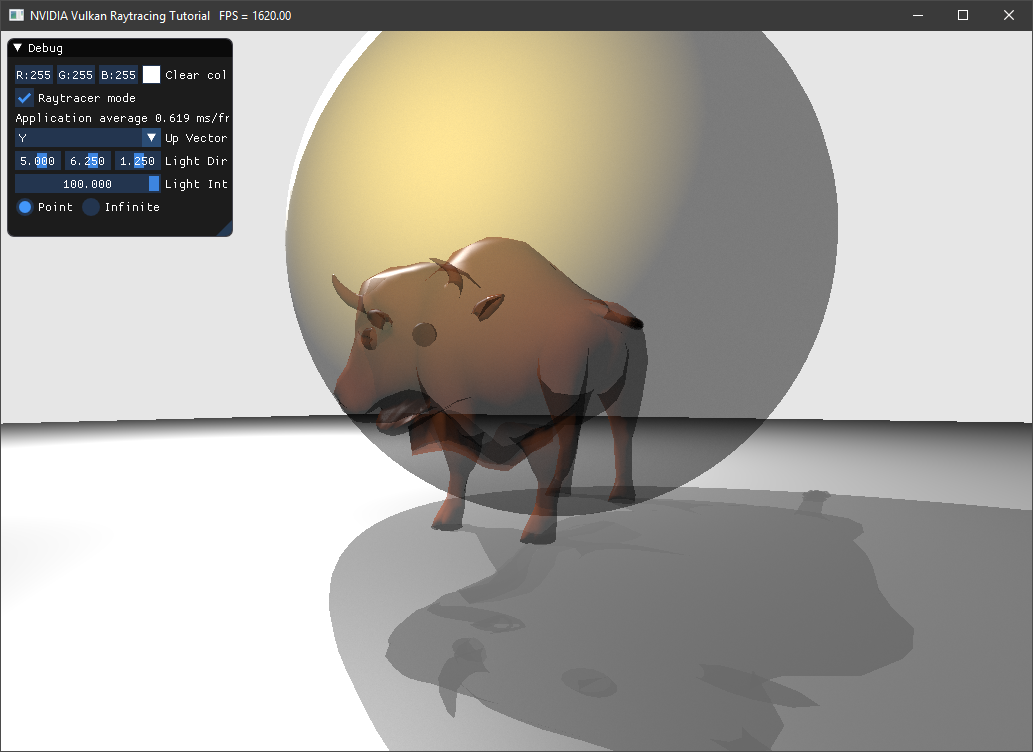
This is an extension of the Vulkan ray tracing [tutorial](vkrt_tutorial.md.htm).
Like closest hit shaders, any hit shaders operate on intersections between rays and geometry. However, the any hit
shader will be executed for all hits along the ray. The closest hit shader will then be invoked on the closest accepted
intersection.
The any hit shader can be useful for discarding intersections, such as for alpha cutouts for example, but can also be
used for simple transparency. In this example we will show what is needed to do to add this shader type and to create a
transparency effect.
!!! Note Note
This example is based on many elements from the [Antialiasing Tutorial](vkrt_tuto_jitter_cam.md.htm).
(insert setup.md.html here)
# Any Hit
## `raytrace.rahit`
Create a new shader file `raytrace.rahit` and rerun CMake to have it added to the solution.
This shader starts like `raytrace.chit`, but uses less information.
~~~~ C++
#version 460
#extension GL_EXT_ray_tracing : require
#extension GL_EXT_nonuniform_qualifier : enable
#extension GL_EXT_scalar_block_layout : enable
#extension GL_GOOGLE_include_directive : enable
#include "random.glsl"
#include "raycommon.glsl"
#include "wavefront.glsl"
// clang-format off
layout(location = 0) rayPayloadInEXT hitPayload prd;
layout(binding = 2, set = 1, scalar) buffer ScnDesc { sceneDesc i[]; } scnDesc;
layout(binding = 4, set = 1) buffer MatIndexColorBuffer { int i[]; } matIndex[];
layout(binding = 5, set = 1, scalar) buffer Vertices { Vertex v[]; } vertices[];
layout(binding = 6, set = 1) buffer Indices { uint i[]; } indices[];
layout(binding = 1, set = 1, scalar) buffer MatColorBufferObject { WaveFrontMaterial m[]; } materials[];
// clang-format on
~~~~
!!! Note
You can find the source of `random.glsl` in the Antialiasing Tutorial [here](../ray_tracing_jitter_cam/README.md#toc1.1).
For the any hit shader, we need to know which material we hit, and whether that material supports transparency. If it is
opaque, we simply return, which means that the hit will be accepted.
~~~~ C++
void main()
{
// Object of this instance
uint objId = scnDesc.i[gl_InstanceID].objId;
// Indices of the triangle
uint ind = indices[nonuniformEXT(objId)].i[3 * gl_PrimitiveID + 0];
// Vertex of the triangle
Vertex v0 = vertices[nonuniformEXT(objId)].v[ind.x];
// Material of the object
int matIdx = matIndex[nonuniformEXT(objId)].i[gl_PrimitiveID];
WaveFrontMaterial mat = materials[nonuniformEXT(objId)].m[matIdx];
if (mat.illum != 4)
return;
~~~~
Now we will apply transparency:
~~~~ C++
if (mat.dissolve == 0.0)
ignoreIntersectionEXT();
else if(rnd(prd.seed) > mat.dissolve)
ignoreIntersectionEXT();
}
~~~~
As you can see, we are using a random number generator to determine if the ray hits or ignores the object. If we
accumulate enough rays, the final result will converge to what we want.
## `raycommon.glsl`
The random `seed` also needs to be passed in the ray payload.
In `raycommon.glsl`, add the seed:
~~~~ C++
struct hitPayload
{
vec3 hitValue;
uint seed;
};
~~~~
## Adding Any Hit to `createRtPipeline`
The any hit shader will be part of the hit shader group. Currently, the hit shader group only contains the closest hit shader.
In `createRtPipeline()`, after loading `raytrace.rchit.spv`, load `raytrace.rahit.spv`
~~~~ C++
vk::ShaderModule ahitSM =
nvvk::createShaderModule(m_device, //
nvh::loadFile("shaders/raytrace.rahit.spv", true, paths));
~~~~
add the any hit shader to the hit group
~~~~ C++
stages.push_back({{}, vk::ShaderStageFlagBits::eClosestHitKHR, chitSM, "main"});
hg.setClosestHitShader(static_cast(stages.size() - 1));
stages.push_back({{}, vk::ShaderStageFlagBits::eAnyHitKHR, ahitSM, "main"});
hg.setAnyHitShader(static_cast(stages.size() - 1));
m_rtShaderGroups.push_back(hg);
~~~~
and at the end, delete it:
~~~~ C++
m_device.destroy(ahitSM);
~~~~
## Give access of the buffers to the Any Hit shader
In `createDescriptorSetLayout()`, we need to allow the Any Hit shader to access some buffers.
This is the case for the material and scene description buffers
~~~~ C++
// Materials (binding = 1)
m_descSetLayoutBind.emplace_back(
vkDS(1, vkDT::eStorageBuffer, nbObj,
vkSS::eVertex | vkSS::eFragment | vkSS::eClosestHitKHR | vkSS::eAnyHitKHR));
// Scene description (binding = 2)
m_descSetLayoutBind.emplace_back( //
vkDS(2, vkDT::eStorageBuffer, 1,
vkSS::eVertex | vkSS::eFragment | vkSS::eClosestHitKHR | vkSS::eAnyHitKHR));
~~~~
and also for the vertex, index and material index buffers:
~~~~ C++
// Materials (binding = 4)
m_descSetLayoutBind.emplace_back( //
vkDS(4, vkDT::eStorageBuffer, nbObj,
vkSS::eFragment | vkSS::eClosestHitKHR | vkSS::eAnyHitKHR));
// Storing vertices (binding = 5)
m_descSetLayoutBind.emplace_back( //
vkDS(5, vkDT::eStorageBuffer, nbObj, vkSS::eClosestHitKHR | vkSS::eAnyHitKHR));
// Storing indices (binding = 6)
m_descSetLayoutBind.emplace_back( //
vkDS(6, vkDT::eStorageBuffer, nbObj, vkSS::eClosestHitKHR | vkSS::eAnyHitKHR));
~~~~
## Opaque Flag
In the example, when creating `VkAccelerationStructureGeometryKHR` objects, we set their flags to `vk::GeometryFlagBitsKHR::eOpaque`. However, this avoided invoking the any hit shader.
We could remove all of the flags, but another issue could happen: the any hit shader could be called multiple times for the same triangle. To have the any hit shader process only one hit per triangle, set the `eNoDuplicateAnyHitInvocation` flag:
~~~~ C++
geometry.setFlags(vk::GeometryFlagBitsKHR::eNoDuplicateAnyHitInvocation);
~~~~
## `raytrace.rgen`
If you have done the previous [Jitter Camera/Antialiasing](../ray_tracing_jitter_cam) tutorial,
you will need just a few changes.
First, `seed` will need to be available in the any hit shader, which is the reason we have added it to the hitPayload structure.
Change the local `seed` to `prd.seed` everywhere.
~~~~ C++
prd.seed = tea(gl_LaunchIDEXT.y * gl_LaunchSizeEXT.x + gl_LaunchIDEXT.x, pushC.frame);
~~~~
For optimization, the `TraceRayEXT` call was using the `gl_RayFlagsOpaqueEXT` flag. But
this will skip the any hit shader, so change it to
~~~~ C++
uint rayFlags = gl_RayFlagsNoneEXT;
~~~~
## `raytrace.rchit`
Similarly, in the closest hit shader, change the flag to `gl_RayFlagsSkipClosestHitShaderEXT`, as we want to enable the any hit and miss shaders, but we still don't care
about the closest hit shader for shadow rays. This will enable transparent shadows.
~~~~ C++
uint flags = gl_RayFlagsSkipClosestHitShaderEXT;
~~~~
# Scene and Model
For a more interesting scene, you can replace the `helloVk.loadModel` calls in `main()` with the following scene:
~~~~ C++
helloVk.loadModel(nvh::findFile("media/scenes/wuson.obj", defaultSearchPaths));
helloVk.loadModel(nvh::findFile("media/scenes/sphere.obj", defaultSearchPaths),
nvmath::scale_mat4(nvmath::vec3f(1.5f))
* nvmath::translation_mat4(nvmath::vec3f(0.0f, 1.0f, 0.0f)));
helloVk.loadModel(nvh::findFile("media/scenes/plane.obj", defaultSearchPaths));
~~~~
## OBJ Materials
By default, all objects are opaque, you will need to change the material description.
Edit the first few lines of `media/scenes/wuson.mtl` and `media/scenes/sphere.mtl` to use a new illumination model (4) with a dissolve value of 0.5:
~~~~ C++
newmtl default
illum 4
d 0.5
...
~~~~
# Accumulation
As mentioned earlier, for the effect to work, we need to accumulate frames over time. Please implement the following from [Jitter Camera/Antialiasing](vkrt_tuto_jitter_cam.md):
* [Frame Number](vkrt_tuto_jitter_cam.md.htm#toc1.2)
* [Storing or Updating](vkrt_tuto_jitter_cam.md.htm#toc1.4)
* [Application Frame Update](vkrt_tuto_jitter_cam.md.htm#toc2)
# Final Code
You can find the final code in the folder [ray_tracing_anyhit](https://github.com/nvpro-samples/vk_raytracing_tutorial_KHR/tree/master/ray_tracing_anyhit)