| .. | ||
| images | ||
| shaders | ||
| CMakeLists.txt | ||
| hello_vulkan.cpp | ||
| hello_vulkan.h | ||
| main.cpp | ||
| README.md | ||

Intersection Shader - Tutorial
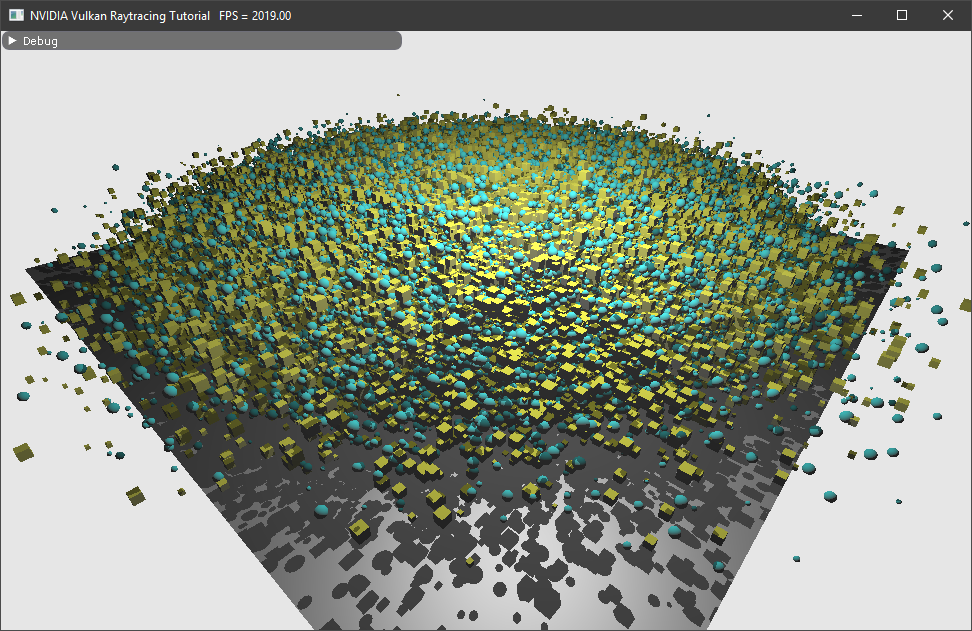 Author: Martin-Karl Lefrançois
Tutorial (Setup)
This is an extension of the Vulkan ray tracing tutorial.
This tutorial chapter shows how to use intersection shader and render different primitives with different materials.
High Level Implementation
On a high level view, we will
- Add 2.000.000 axis aligned bounding boxes in a BLAS
- 2 materials will be added
- Every second intersected object will be a sphere or a cube and will use one of the two material.
To do this, we will need to:
- Add an intersection shader (.rint)
- Add a new closest hit shader (.chit)
- Create
VkAccelerationStructureGeometryKHRfromVkAccelerationStructureGeometryAabbsDataKHR
Creating all spheres
In the HelloVulkan class, we will add the structures we will need. First the structure that defines a sphere.
  struct Sphere
  {
    nvmath::vec3f center;
    float         radius;
  };
Then we need the Aabb structure holding all the spheres, but also used for the creation of the BLAS (VK_GEOMETRY_TYPE_AABBS_KHR).
  struct Aabb
  {
    nvmath::vec3f minimum;
    nvmath::vec3f maximum;
  };
All the information will need to be hold in buffers, which will be available to the shaders.
  std::vector<Sphere> m_spheres;                // All spheres
  nvvkBuffer          m_spheresBuffer;          // Buffer holding the spheres
  nvvkBuffer          m_spheresAabbBuffer;      // Buffer of all Aabb
  nvvkBuffer          m_spheresMatColorBuffer;  // Multiple materials
  nvvkBuffer          m_spheresMatIndexBuffer;  // Define which sphere uses which material
Finally, there are two functions, one to create the spheres, and one that will create the intermediate structure for the BLAS.
  void                              createSpheres();
  nvvk::RaytracingBuilderKHR::Blas  sphereToVkGeometryKHR();
The following implementation will create 2.000.000 spheres at random positions and radius. It will create the Aabb from the sphere definition, two materials which will be assigned alternatively to each object. All the created information will be moved to Vulkan buffers to be accessed by the intersection and closest shaders.
//--------------------------------------------------------------------------------------------------
// Creating all spheres
//
void HelloVulkan::createSpheres()
{
  std::random_device                    rd{};
  std::mt19937                          gen{rd()};
  std::normal_distribution<float>       xzd{0.f, 5.f};
  std::normal_distribution<float>       yd{3.f, 1.f};
  std::uniform_real_distribution<float> radd{.05f, .2f};

  // All spheres
  Sphere s;
  for(uint32_t i = 0; i < 2000000; i++)
  {
    s.center = nvmath::vec3f(xzd(gen), yd(gen), xzd(gen));
    s.radius = radd(gen);
    m_spheres.emplace_back(s);
  }

  // Axis aligned bounding box of each sphere
  std::vector<Aabb> aabbs;
  for(const auto& s : m_spheres)
  {
    Aabb aabb;
    aabb.minimum = s.center - nvmath::vec3f(s.radius);
    aabb.maximum = s.center + nvmath::vec3f(s.radius);
    aabbs.emplace_back(aabb);
  }

  // Creating two materials
  MatrialObj mat;
  mat.diffuse = vec3f(0, 1, 1);
  std::vector<MatrialObj> materials;
  std::vector<int>        matIdx;
  materials.emplace_back(mat);
  mat.diffuse = vec3f(1, 1, 0);
  materials.emplace_back(mat);

  // Assign a material to each sphere
  for(size_t i = 0; i < m_spheres.size(); i++)
  {
    matIdx.push_back(i % 2);
  }

  // Creating all buffers
  using vkBU = vk::BufferUsageFlagBits;
  nvvk::CommandPool genCmdBuf(m_device, m_graphicsQueueIndex);
  auto              cmdBuf = genCmdBuf.createCommandBuffer();
  m_spheresBuffer          = m_alloc.createBuffer(cmdBuf, m_spheres, vkBU::eStorageBuffer);
  m_spheresAabbBuffer      = m_alloc.createBuffer(cmdBuf, aabbs, vkBU::eShaderDeviceAddress);
  m_spheresMatIndexBuffer  = m_alloc.createBuffer(cmdBuf, matIdx, vkBU::eStorageBuffer);
  m_spheresMatColorBuffer  = m_alloc.createBuffer(cmdBuf, materials, vkBU::eStorageBuffer);
  genCmdBuf.submitAndWait(cmdBuf);

  // Debug information
  m_debug.setObjectName(m_spheresBuffer.buffer, "spheres");
  m_debug.setObjectName(m_spheresAabbBuffer.buffer, "spheresAabb");
  m_debug.setObjectName(m_spheresMatColorBuffer.buffer, "spheresMat");
  m_debug.setObjectName(m_spheresMatIndexBuffer.buffer, "spheresMatIdx");
}
Do not forget to destroy the buffers in destroyResources()
  m_alloc.destroy(m_spheresBuffer);
  m_alloc.destroy(m_spheresAabbBuffer);
  m_alloc.destroy(m_spheresMatColorBuffer);
  m_alloc.destroy(m_spheresMatIndexBuffer);
We need a new bottom level acceleration structure (BLAS) to hold the implicit primitives. For efficiency and since all those primitives are static, they will all be added in a single BLAS.
What is changing compare to triangle primitive is the Aabb data (see Aabb structure) and the geometry type (VK_GEOMETRY_TYPE_AABBS_KHR).
//--------------------------------------------------------------------------------------------------
// Returning the ray tracing geometry used for the BLAS, containing all spheres
//
nvvk::RaytracingBuilderKHR::Blas HelloVulkan::sphereToVkGeometryKHR()
{
  vk::AccelerationStructureCreateGeometryTypeInfoKHR asCreate;
  asCreate.setGeometryType(vk::GeometryTypeKHR::eAabbs);
  asCreate.setMaxPrimitiveCount((uint32_t)m_spheres.size());  // Nb triangles
  asCreate.setIndexType(vk::IndexType::eNoneKHR);
  asCreate.setVertexFormat(vk::Format::eUndefined);
  asCreate.setMaxVertexCount(0);
  asCreate.setAllowsTransforms(VK_FALSE);  // No adding transformation matrices


  vk::DeviceAddress dataAddress = m_device.getBufferAddress({m_spheresAabbBuffer.buffer});
  vk::AccelerationStructureGeometryAabbsDataKHR aabbs;
  aabbs.setData(dataAddress);
  aabbs.setStride(sizeof(Aabb));

  // Setting up the build info of the acceleration
  vk::AccelerationStructureGeometryKHR asGeom;
  asGeom.setGeometryType(asCreate.geometryType);
  asGeom.setFlags(vk::GeometryFlagBitsKHR::eOpaque);
  asGeom.geometry.setAabbs(aabbs);

  vk::AccelerationStructureBuildOffsetInfoKHR offset;
  offset.setFirstVertex(0);
  offset.setPrimitiveCount(asCreate.maxPrimitiveCount);
  offset.setPrimitiveOffset(0);
  offset.setTransformOffset(0);

  nvvk::RaytracingBuilderKHR::Blas blas;
  blas.asGeometry.emplace_back(asGeom);
  blas.asCreateGeometryInfo.emplace_back(asCreate);
  blas.asBuildOffsetInfo.emplace_back(offset);
  return blas;
}
Setting Up the Scene
In main.cpp, where we are loading the OBJ model, we can replace it with
  // Creation of the example
  helloVk.loadModel(nvh::findFile("media/scenes/plane.obj", defaultSearchPaths));
  helloVk.createSpheres();
Note: it is possible to have more OBJ models, but the spheres will need to be added after all of them.
The scene will be large, better to move the camera out
CameraManip.setLookat(nvmath::vec3f(20, 20, 20), nvmath::vec3f(0, 1, 0), nvmath::vec3f(0, 1, 0));
Acceleration Structures
BLAS
The function createBottomLevelAS() is creating a BLAS per OBJ, the following modification will add a new BLAS containing the Aabb's of all spheres.
void HelloVulkan::createBottomLevelAS()
{
  // BLAS - Storing each primitive in a geometry
  std::vector<nvvk::RaytracingBuilderKHR::Blas> allBlas;
  allBlas.reserve(m_objModel.size());
  for(const auto& obj : m_objModel)
  {
    auto blas = objectToVkGeometryKHR(obj);

    // We could add more geometry in each BLAS, but we add only one for now
    allBlas.emplace_back(blas);
  }

  // Spheres
  {
    auto blas = sphereToVkGeometryKHR();
    allBlas.emplace_back(blas);
  }

  m_rtBuilder.buildBlas(allBlas, vk::BuildAccelerationStructureFlagBitsKHR::ePreferFastTrace);
}
TLAS
Similarly in createTopLevelAS(), the top level acceleration structure will need to add a reference to the BLAS of the spheres. We are setting the instanceID and blasID to the last element, which is why the sphere BLAS must be added after everything else.
The hitGroupId will be set to 1 instead of 0. We need to add a new hit group for the implicit primitives, since we will need to compute attributes like the normal, since they are not provide like with triangle primitives.
Just before building the TLAS, we need to add the following
  // Add the blas containing all spheres
  {
    nvvk::RaytracingBuilder::Instance rayInst;
    rayInst.transform  = m_objInstance[0].transform;          // Position of the instance
    rayInst.instanceId = static_cast<uint32_t>(tlas.size());  // gl_InstanceID
    rayInst.blasId     = static_cast<uint32_t>(m_objModel.size());
    rayInst.hitGroupId = 1;  // We will use the same hit group for all objects
    rayInst.flags      = vk::GeometryInstanceFlagBitsKHR::eTriangleCullDisable;
    tlas.emplace_back(rayInst);
  }
Descriptors
To access the newly created buffers holding all the spheres and materials, some changes are required to the descriptors.
In function createDescriptorSetLayout(), the addition of the material and material index need to be instructed.
  // Materials (binding = 1)
  m_descSetLayoutBind.emplace_back(vkDS(1, vkDT::eStorageBuffer, nbObj + 1,
                                        vkSS::eVertex | vkSS::eFragment | vkSS::eClosestHitKHR));
  // Materials Index (binding = 4)
  m_descSetLayoutBind.emplace_back(
      vkDS(4, vkDT::eStorageBuffer, nbObj + 1, vkSS::eFragment | vkSS::eClosestHitKHR));
And the new buffer holding the spheres
  // Storing spheres (binding = 7)
  m_descSetLayoutBind.emplace_back(  //
      vkDS(7, vkDT::eStorageBuffer, 1, vkSS::eClosestHitKHR | vkSS::eIntersectionKHR));
The function updateDescriptorSet() which is writing the values of the buffer need also to be modified.
At the end of the loop on all models, lets add the new material and material index.
  for(auto& model : m_objModel)
  {
    dbiMat.emplace_back(model.matColorBuffer.buffer, 0, VK_WHOLE_SIZE);
    dbiMatIdx.emplace_back(model.matIndexBuffer.buffer, 0, VK_WHOLE_SIZE);
    dbiVert.emplace_back(model.vertexBuffer.buffer, 0, VK_WHOLE_SIZE);
    dbiIdx.emplace_back(model.indexBuffer.buffer, 0, VK_WHOLE_SIZE);
  }
  dbiMat.emplace_back(m_spheresMatColorBuffer.buffer, 0, VK_WHOLE_SIZE);
  dbiMatIdx.emplace_back(m_spheresMatIndexBuffer.buffer, 0, VK_WHOLE_SIZE);
Then write the buffer for the spheres
  vk::DescriptorBufferInfo dbiSpheres{m_spheresBuffer.buffer, 0, VK_WHOLE_SIZE};
  writes.emplace_back(m_descSetLayoutBind.makeWrite(m_descSet, 7, dbiSpheres));
Intersection Shader
The intersection shader is added to the Hit Group VK_RAY_TRACING_SHADER_GROUP_TYPE_PROCEDURAL_HIT_GROUP_KHR. In our example, we already have a Hit Group for triangle and a closest hit associated. We will add a new one, which will become the Hit Group ID (1), see the TLAS section.
Here is how the two hit group looks like:
  // Hit Group0 - Closest Hit
  vk::ShaderModule chitSM =
      nvvk::createShaderModule(m_device,  //
                               nvh::loadFile("shaders/raytrace.rchit.spv", true, paths));

  {
    vk::RayTracingShaderGroupCreateInfoKHR hg{vk::RayTracingShaderGroupTypeKHR::eTrianglesHitGroup,
                                              VK_SHADER_UNUSED_KHR, VK_SHADER_UNUSED_KHR,
                                              VK_SHADER_UNUSED_KHR, VK_SHADER_UNUSED_KHR};
    stages.push_back({{}, vk::ShaderStageFlagBits::eClosestHitKHR, chitSM, "main"});
    hg.setClosestHitShader(static_cast<uint32_t>(stages.size() - 1));
    m_rtShaderGroups.push_back(hg);
  }

  // Hit Group1 - Closest Hit + Intersection (procedural)
  vk::ShaderModule chit2SM =
      nvvk::createShaderModule(m_device,  //
                               nvh::loadFile("shaders/raytrace2.rchit.spv", true, paths));
  vk::ShaderModule rintSM =
      nvvk::createShaderModule(m_device,  //
                               nvh::loadFile("shaders/raytrace.rint.spv", true, paths));
  {
    vk::RayTracingShaderGroupCreateInfoKHR hg{vk::RayTracingShaderGroupTypeKHR::eProceduralHitGroup,
                                              VK_SHADER_UNUSED_KHR, VK_SHADER_UNUSED_KHR,
                                              VK_SHADER_UNUSED_KHR, VK_SHADER_UNUSED_KHR};
    stages.push_back({{}, vk::ShaderStageFlagBits::eClosestHitKHR, chit2SM, "main"});
    hg.setClosestHitShader(static_cast<uint32_t>(stages.size() - 1));
    stages.push_back({{}, vk::ShaderStageFlagBits::eIntersectionKHR, rintSM, "main"});
    hg.setIntersectionShader(static_cast<uint32_t>(stages.size() - 1));
    m_rtShaderGroups.push_back(hg);
  }
And destroy the two shaders at the end
  m_device.destroy(chit2SM);
  m_device.destroy(rintSM);
raycommon.glsl
To share the structure of the data across the shaders, we can add the following to raycommon.glsl
struct Sphere
{
  vec3  center;
  float radius;
};

struct Aabb
{
  vec3 minimum;
  vec3 maximum;
};

#define KIND_SPHERE 0
#define KIND_CUBE 1
raytrace.rint
The intersection shader raytrace.rint need to be added to the shader directory and CMake to be rerun such that it is added to the project. The shader will be called every time a ray will hit one of the Aabb of the scene. Note that there are no Aabb information that can be retrieved in the intersection shader. It is also not possible to have the value of the hit point that the ray tracer might have calculated on the GPU.
The only information we have is that one of the Aabb was hit and using the gl_PrimitiveID, it is possible to know which one it was. Then, with the information stored in the buffer, we can retrive the geometry information of the sphere.
We first declare the extensions and include common files.
#version 460
#extension GL_EXT_ray_tracing : require
#extension GL_EXT_nonuniform_qualifier : enable
#extension GL_EXT_scalar_block_layout : enable
#extension GL_GOOGLE_include_directive : enable
#include "raycommon.glsl"
#include "wavefront.glsl"
Then we must add the following, otherwise the intersection shader will not report any hit.
hitAttributeEXT vec3 HitAttribute;
The following is the topology of all spheres, which we will be able to retrieve using gl_PrimitiveID.
layout(binding = 7, set = 1, scalar) buffer allSpheres_
{
  Sphere i[];
}
allSpheres;
We will implement two intersetion method against the incoming ray.
struct Ray
{
  vec3 origin;
  vec3 direction;
};
The sphere intersection
// Ray-Sphere intersection
// http://viclw17.github.io/2018/07/16/raytracing-ray-sphere-intersection/
float hitSphere(const Sphere s, const Ray r)
{
  vec3  oc           = r.origin - s.center;
  float a            = dot(r.direction, r.direction);
  float b            = 2.0 * dot(oc, r.direction);
  float c            = dot(oc, oc) - s.radius * s.radius;
  float discriminant = b * b - 4 * a * c;
  if(discriminant < 0)
  {
    return -1.0;
  }
  else
  {
    return (-b - sqrt(discriminant)) / (2.0 * a);
  }
}
And the axis aligned bounding box intersection
// Ray-AABB intersection
float hitAabb(const Aabb aabb, const Ray r)
{
  vec3  invDir = 1.0 / r.direction;
  vec3  tbot   = invDir * (aabb.minimum - r.origin);
  vec3  ttop   = invDir * (aabb.maximum - r.origin);
  vec3  tmin   = min(ttop, tbot);
  vec3  tmax   = max(ttop, tbot);
  float t0     = max(tmin.x, max(tmin.y, tmin.z));
  float t1     = min(tmax.x, min(tmax.y, tmax.z));
  return t1 > max(t0, 0.0) ? t0 : -1.0;
}
Both are returning -1 if there is no hit, otherwise, it returns the distance from to origin of the ray.
Retrieving the ray is straight forward
void main()
{
  Ray ray;
  ray.origin    = gl_WorldRayOriginEXT;
  ray.direction = gl_WorldRayDirectionEXT;
And getting the information about the geometry enclosed in the Aabb can be done like this.
  // Sphere data
  Sphere sphere = allSpheres.i[gl_PrimitiveID];
Now we just need to know if we will hit a sphere or a cube.
  float tHit    = -1;
  int   hitKind = gl_PrimitiveID % 2 == 0 ? KIND_SPHERE : KIND_CUBE;
  if(hitKind == KIND_SPHERE)
  {
    // Sphere intersection
    tHit = hitSphere(sphere, ray);
  }
  else
  {
    // AABB intersection
    Aabb aabb;
    aabb.minimum = sphere.center - vec3(sphere.radius);
    aabb.maximum = sphere.center + vec3(sphere.radius);
    tHit         = hitAabb(aabb, ray);
  }
Intersection information is reported using reportIntersectionEXT, with a distance from the origin and a second argument (hitKind) that can be used to differentiate the primitive type.
  // Report hit point
  if(tHit > 0)
    reportIntersectionEXT(tHit, hitKind);
}
The shader can be found here
raytrace2.rchit
The new closest hit can be found here
This shader is almost identical to original raytrace.rchit, but since the primitive is implicit, we will only need to compute the normal for the primitive that was hit.
We retrieve the world position from the ray and the gl_HitTEXT which was set in the intersection shader.
vec3 worldPos = gl_WorldRayOriginEXT + gl_WorldRayDirectionEXT * gl_HitTEXT;
The sphere information is retrieved the same way as in the raytrace.rint shader.
Sphere instance = allSpheres.i[gl_PrimitiveID];
Then we compute the normal, as for a sphere.
  // Computing the normal at hit position
  vec3 normal = normalize(worldPos - instance.center);
To know if we have intersect a cube rather than a sphere, we are using gl_HitKindEXT, which was set in the second argument of reportIntersectionEXT.
So when this is a cube, we set the normal to the major axis.
  // Computing the normal for a cube if the hit intersection was reported as 1
  if(gl_HitKindEXT == KIND_CUBE)  // Aabb
  {
    vec3  absN = abs(normal);
    float maxC = max(max(absN.x, absN.y), absN.z);
    normal     = (maxC == absN.x) ?
                 vec3(sign(normal.x), 0, 0) :
                 (maxC == absN.y) ? vec3(0, sign(normal.y), 0) : vec3(0, 0, sign(normal.z));
  }