| .. | ||
| images | ||
| shaders | ||
| CMakeLists.txt | ||
| hello_vulkan.cpp | ||
| hello_vulkan.h | ||
| main.cpp | ||
| README.md | ||

Motion Blur
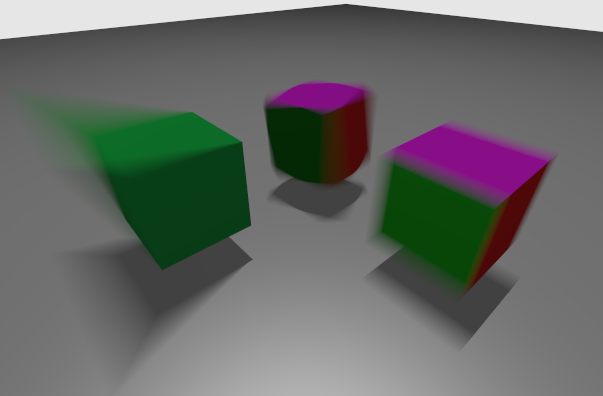
This is an extension of the Vulkan ray tracing tutorial.
If you haven't compiled it before, here is the setup.
VK_NV_ray_tracing_motion_blur
This sample shows the usage of the motion blur extension. In changes from the original sample, we will do the following:
- Use trace call with a time parameter.
- Using the various flags to enable motion support in an acceleration structure.
- Support for time-varying vertex positions in a geometry.
- Add motion over time to instances, including scaling, shearing, rotation, and translation (SRT) and matrix motion, while keeping some static.
Defining an animation works by defining the state of the scene at a start time, T0, and an end time, T1. For instance, T0 could be the start of a frame, and T1 could be the end of a frame, then rays can be traced at any intermediate time, such as at t=0.5, halfway through the frame, and motion blur can be done by choosing a random t for each ray.
Enabling Motion Blur
Extensions
In main.cpp, we add the device extension VK_NV_ray_tracing_motion_blur and enable all features.
  // #NV_Motion_blur
  VkPhysicalDeviceRayTracingMotionBlurFeaturesNV rtMotionBlurFeatures{VK_STRUCTURE_TYPE_PHYSICAL_DEVICE_RAY_TRACING_MOTION_BLUR_FEATURES_NV};
  contextInfo.addDeviceExtension(VK_NV_RAY_TRACING_MOTION_BLUR_EXTENSION_NAME, false, &rtMotionBlurFeatures);  // Required for motion blur
Pipeline
When creating the ray tracing pipeline, the VkRayTracingPipelineCreateInfoKHR struct's flags must include VK_PIPELINE_CREATE_RAY_TRACING_ALLOW_MOTION_BIT_NV.
rayPipelineInfo.flags = VK_PIPELINE_CREATE_RAY_TRACING_ALLOW_MOTION_BIT_NV;
Scene Objects
We will use the following four models. The later sections will add matrix animation to two instances of the cube_multi.obj model, and the plane.obj model will stay static. The third and fourth models are the keyframes for a vertex animation. Cube.obj is the cube at time 0 (T0), and cube_modif.obj is the cube at time 1 (T1).
  // Creation of the example
  helloVk.loadModel(nvh::findFile("media/scenes/cube_multi.obj", defaultSearchPaths, true));
  helloVk.loadModel(nvh::findFile("media/scenes/plane.obj", defaultSearchPaths, true));
  helloVk.loadModel(nvh::findFile("media/scenes/cube.obj", defaultSearchPaths, true));
  helloVk.loadModel(nvh::findFile("media/scenes/cube_modif.obj", defaultSearchPaths, true));
Vertex Varying Motion
As seen in the picture, the vertices of the left green cube change positions over time.
We specify this by giving two geometries to the BLAS builder. Setting the geometry at T0
is done the same way as before. To add the destination keyframe at T1, we make the
VkAccelerationStructureGeometryTrianglesDataKHR structure's pNext field point to a
VkAccelerationStructureGeometryMotionTrianglesDataNV structure. Additionally, we must add
VK_BUILD_ACCELERATION_STRUCTURE_MOTION_BIT_NV to the BLAS build info flags.
At first we are adding the cube_multi and plane. The cube_multi object's geometry doesn't animate, but its transformation does, so we will set its animation in the TLAS in the Instance Motion section.
void HelloVulkan::createBottomLevelAS()
{
  // Static geometries
  std::vector<nvvk::RaytracingBuilderKHR::BlasInput> allBlas;
  allBlas.emplace_back(objectToVkGeometryKHR(m_objModel[0]));
  allBlas.emplace_back(objectToVkGeometryKHR(m_objModel[1]));
Then we add the cube and add the motion information; the reference to the geometry at T1 and the flag for which we want this object to have motion.
  // Animated geometry
  allBlas.emplace_back(objectToVkGeometryKHR(m_objModel[2]));
  // Adding the m_objModel[3] as the destination of m_objModel[2]
  VkAccelerationStructureGeometryMotionTrianglesDataNV motionTriangles{
      VK_STRUCTURE_TYPE_ACCELERATION_STRUCTURE_GEOMETRY_MOTION_TRIANGLES_DATA_NV};
  motionTriangles.vertexData.deviceAddress = nvvk::getBufferDeviceAddress(m_device, m_objModel[3].vertexBuffer.buffer);
  allBlas[2].asGeometry[0].geometry.triangles.pNext = &motionTriangles;
  // Telling that this geometry has motion
  allBlas[2].flags = VK_BUILD_ACCELERATION_STRUCTURE_MOTION_BIT_NV;
Building all the BLAS stays the same.
  m_rtBuilder.buildBlas(allBlas, VK_BUILD_ACCELERATION_STRUCTURE_PREFER_FAST_TRACE_BIT_KHR);
}
Instance Motion
Instance motion describes motion in the TLAS, where objects move as a whole. There are 3 types:
- Static
- Matrix motion
- SRT motion
The array of instances uses VkAccelerationStructureMotionInstanceNV instead of VkAccelerationStructureInstanceKHR.
std::vector<VkAccelerationStructureMotionInstanceNVPad> tlas;
Matrix Motion
The moving matrix needs to fill the VkAccelerationStructureMatrixMotionInstanceNV structure.
  // Cube (moving/matrix translation)
  objId = 0;
  {
    // Position of the instance at T0 and T1
    nvmath::mat4f matT0(1);  // Identity
    nvmath::mat4f matT1 = nvmath::translation_mat4(nvmath::vec3f(0.30f, 0.0f, 0.0f));

    VkAccelerationStructureMatrixMotionInstanceNV data;
    data.transformT0                            = nvvk::toTransformMatrixKHR(matT0);
    data.transformT1                            = nvvk::toTransformMatrixKHR(matT1);
    data.instanceCustomIndex                    = objId;  // gl_InstanceCustomIndexEXT
    data.accelerationStructureReference         = m_rtBuilder.getBlasDeviceAddress(m_objInstance[objId].objIndex);
    data.instanceShaderBindingTableRecordOffset = 0;  // We will use the same hit group for all objects
    data.flags                                  = VK_GEOMETRY_INSTANCE_TRIANGLE_FACING_CULL_DISABLE_BIT_KHR;
    data.mask                                   = 0xFF;
    VkAccelerationStructureMotionInstanceNVPad rayInst;
    rayInst.type                      = VK_ACCELERATION_STRUCTURE_MOTION_INSTANCE_TYPE_MATRIX_MOTION_NV;
    rayInst.data.matrixMotionInstance = data;
    tlas.emplace_back(rayInst);
  }
SRT Motion
The SRT motion uses the VkAccelerationStructureSRTMotionInstanceNV
structure, where it interpolates between two VkSRTDataNV structures.
// Cube (moving/SRT rotation)
  objId = 0;
  {
    nvmath::quatf rot;
    rot.from_euler_xyz({0, 0, 0});
    // Position of the instance at T0 and T1
    VkSRTDataNV matT0{};  // Translated to 0,0,2
    matT0.sx          = 1.0f;
    matT0.sy          = 1.0f;
    matT0.sz          = 1.0f;
    matT0.tz          = 2.0f;
    matT0.qx          = rot.x;
    matT0.qy          = rot.y;
    matT0.qz          = rot.z;
    matT0.qw          = rot.w;
    VkSRTDataNV matT1 = matT0;  // Setting a rotation
    rot.from_euler_xyz({deg2rad(10.0f), deg2rad(30.0f), 0.0f});
    matT1.qx = rot.x;
    matT1.qy = rot.y;
    matT1.qz = rot.z;
    matT1.qw = rot.w;

    VkAccelerationStructureSRTMotionInstanceNV data{};
    data.transformT0                            = matT0;
    data.transformT1                            = matT1;
    data.instanceCustomIndex                    = objId;  // gl_InstanceCustomIndexEXT
    data.accelerationStructureReference         = m_rtBuilder.getBlasDeviceAddress(m_objInstance[objId].objIndex);
    data.instanceShaderBindingTableRecordOffset = 0;  // We will use the same hit group for all objects
    data.flags                                  = VK_GEOMETRY_INSTANCE_TRIANGLE_FACING_CULL_DISABLE_BIT_KHR;
    data.mask                                   = 0xFF;
    VkAccelerationStructureMotionInstanceNVPad rayInst;
    rayInst.type                   = VK_ACCELERATION_STRUCTURE_MOTION_INSTANCE_TYPE_SRT_MOTION_NV;
    rayInst.data.srtMotionInstance = data;
    tlas.emplace_back(rayInst);
  }
Static
Static instances use the same structure as we normally use with static scenes, VkAccelerationStructureInstanceKHR.
  // Plane (static)
  objId = 1;
  {
    nvmath::mat4f matT0 = nvmath::translation_mat4(nvmath::vec3f(0, -1, 0));

    VkAccelerationStructureInstanceKHR data{};
    data.transform                              = nvvk::toTransformMatrixKHR(matT0);  // Position of the instance
    data.instanceCustomIndex                    = objId;                              // gl_InstanceCustomIndexEXT
    data.accelerationStructureReference         = m_rtBuilder.getBlasDeviceAddress(m_objInstance[objId].objIndex);
    data.instanceShaderBindingTableRecordOffset = 0;  // We will use the same hit group for all objects
    data.flags                                  = VK_GEOMETRY_INSTANCE_TRIANGLE_FACING_CULL_DISABLE_BIT_KHR;
    data.mask                                   = 0xFF;
    VkAccelerationStructureMotionInstanceNVPad rayInst;
    rayInst.type                = VK_ACCELERATION_STRUCTURE_MOTION_INSTANCE_TYPE_STATIC_NV;
    rayInst.data.staticInstance = data;
    tlas.emplace_back(rayInst);
  }
Building
The building call is similar, only the flag is changing.
m_rtBuilder.buildTlas(tlas, VK_BUILD_ACCELERATION_STRUCTURE_MOTION_BIT_NV, false, true);
Shader
In the shader, we enable the GL_NV_ray_tracing_motion_blur extension.
#extension GL_NV_ray_tracing_motion_blur : require
Then we call traceRayMotionNV instead of traceRayEXT. The time argument varies between 0 and 1.
    traceRayMotionNV(topLevelAS,     // acceleration structure
                     rayFlags,       // rayFlags
                     0xFF,           // cullMask
                     0,              // sbtRecordOffset
                     0,              // sbtRecordStride
                     0,              // missIndex
                     origin.xyz,     // ray origin
                     tMin,           // ray min range
                     direction.xyz,  // ray direction
                     tMax,           // ray max range
                     time,           // time
                     0               // payload (location = 0)
    );
Other
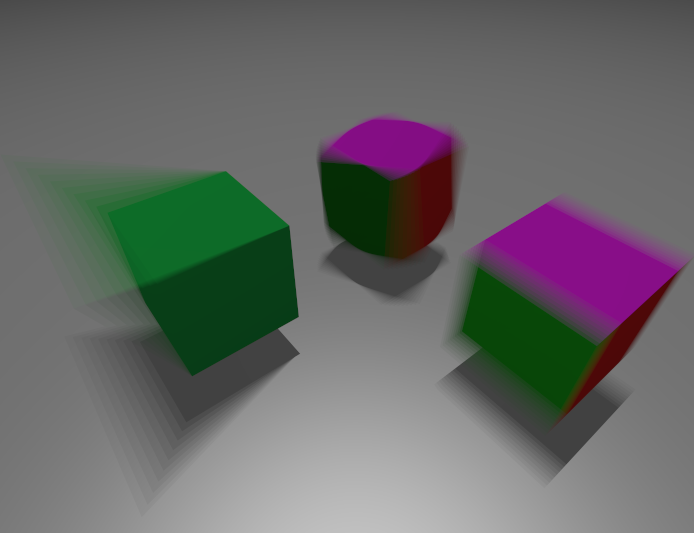
We have used some technique from the jitter cam to sampling time randomly. Using random time value for each pixel at each frame gives a nicer look when accumulated over time then using a single time per frame.
This is the how stuttered motion would look like.
 https://en.wikipedia.org/wiki/Rotary_disc_shutter
⚠️ Using motion blur pipeline with all instances static will be slower than using the static pipeline. Not by much but for performance, it's better to use the appropriate pipeline.
⚠️ Calling traceRayEXT from raytrace.rchit works, and we get motion-blurred shadows without having to call traceRayMotionNV in the closest-hit shader. This works only if traceRayEXT is called within the execution of a motion trace call.